Table of Contents
- Why Yoast and RankMath Plugins Fail B2B Manufacturing Sites
- How to Connect Organization, Product, Service and Person Schema
- How to Add ISO 9001, BIS and Factory Certifications to Schema
- How to Add Specs, Tolerances and MOQ to B2B Product Schema
- How to Link Custom Services and Engineer Credentials for E-E-A-T
- How to Auto-Generate JSON-LD From Product Spec Tables
- How to Fix 'Missing Field Price' Warnings on B2B Schema
- Conclusion
- Frequently Asked Questions
A B2B JSON-LD schema stack is a connected @graph array that links Organization, Product, Service, and Person schema nodes using @id pointers. Instead of retail checkout markup, it declares ISO certifications in hasCredential, machining tolerances and MOQ in PropertyValue and Offer fields, and engineer sign-off in reviewedBy for Google and AI search.
Most structured data tutorials on the web are written for online shoe stores and recipe blogs. They assume every product has a fixed checkout price, a parcel shipping rate, and customer star ratings. When a developer tries to apply that retail template to an Indian B2B manufacturer, such as an API 6D valve foundry in Ahmedabad, an IATF 16949 auto component plant in Pune, or a WHO-GMP pharmaceutical contract manufacturer in Hyderabad, the markup breaks immediately.
Industrial procurement doesn't run on impulse checkout buttons. A purchase engineer or an AI sourcing agent evaluates a vendor by connecting four distinct layers of proof: Is the parent company legally incorporated and ISO certified? Does the physical factory have the tonnage and lab equipment to run the job? Does the component meet exact dimensional tolerances and ASTM or DIN material standards? And which qualified metallurgist or charter professional verified those technical claims?
At Square Root SEO, structured data is the third pillar (Intelligence) of our A.C.I.D. Framework and the machine-readable backbone of every Digital Factory, Digital Office, and Digital Showroom we ship. While our strategic guides explain why schema markup intelligence drives AI citations and how to plan foundational AI schema markup for B2B websites, this developer guide answers the exact implementation questions engineers ask when linking ISO certifications, factory specs, and E-E-A-T credentials in JSON-LD.
Why Are Yoast and RankMath Schema Plugins Not Enough for B2B Manufacturing Websites?
Yoast and RankMath schema plugins are not enough for B2B manufacturing websites because they generate disconnected schema blocks built for retail e-commerce and blogs. They lack fields for ISO certifications, plant tonnage, machining tolerances, or engineer sign-offs, and they trigger Google Search Console price errors on custom RFQ industrial products.
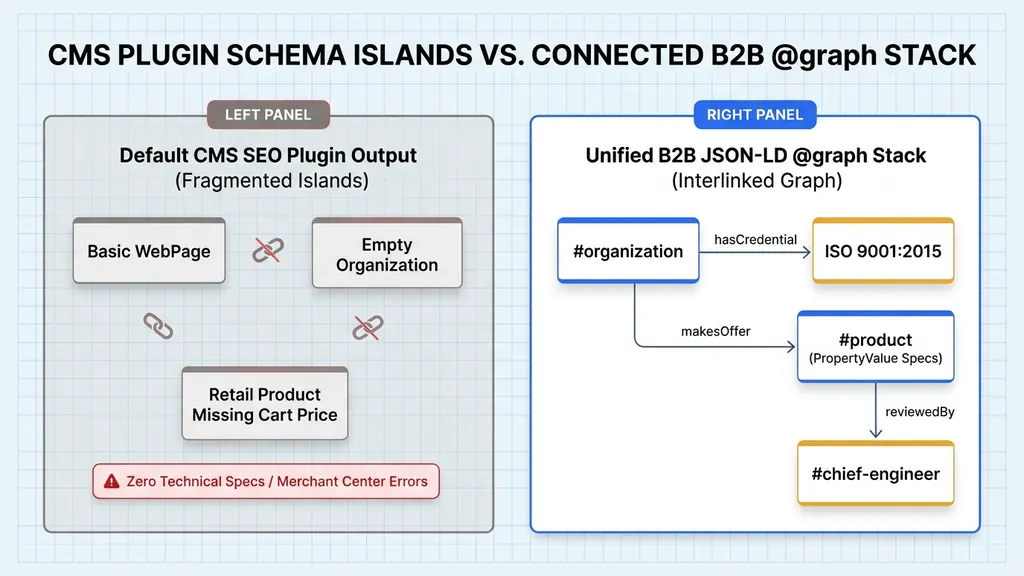
View the page source of a typical WordPress or Shopify B2B site running a default SEO plugin and you will see three separate <script type="application/ld+json"> blocks dumped into the document head by three different plugins. One block declares an Article or WebPage. A second plugin outputs a bare Organization with only a company name and homepage link. A third WooCommerce extension emits a retail Product node expecting a fixed currency price.
To an entity parser or an LLM retrieval pipeline, those disconnected blocks suffer from two fatal flaws. First, they lack relational pointers: nothing in the code tells the parser that the Product on the page is manufactured in the ISO 9001 plant owned by the Organization, or that the tolerance table was verified by the Person listed on the leadership page. In our technical audits, we measure this using a metric we call Graph Connectivity Density (GCD), defined as the ratio of resolved internal @id edges to total schema nodes on a page. Default plugin stacks score near zero because every block is an isolated island.
Second, off-the-shelf plugins strip out the exact engineering attributes that win B2B contracts. No checkbox in a generic SEO plugin asks for your NABL lab accreditation number, your CNC spindle envelope in millimetres, your chemical CAS registry number, or your minimum order quantity in metric tonnes. If you leave those facts buried in prose paragraphs while your JSON-LD stays empty, AI parsers have to guess at your capabilities, and they routinely skip ambiguous vendors in favour of structured competitors.
How Do I Connect Organization, Product, Service, and Person Schema Together in JSON-LD?
You connect Organization, Product, Service, and Person schema together by placing all entities inside one JSON-LD @graph array and giving each entity a unique @id URI (such as #organization or #product). Reference those exact @id strings inside manufacturer, provider, worksFor, and reviewedBy fields to link your entire stack.
Instead of scattering multiple JSON-LD script tags across a template or nesting five levels of repetitive JSON objects inside every page, production B2B architecture uses the W3C JSON-LD @graph container. Think of @graph as a flat array of database records at the top level of a single script block, where relationships between records are declared using lightweight @id foreign keys.
The rule for minting @id URIs is strict: combine the canonical URL where the entity primarily lives with a descriptive hash fragment that never changes during visual redesigns. For example, your company entity lives at https://yourdomain.com/#organization. Your Unit-1 manufacturing facility lives at https://yourdomain.com/#vatva-plant. Your Chief Metallurgist lives at https://yourdomain.com/about/#dr-vikram-desai. Once minted, any product or service page on your domain can link to your company in one line ("manufacturer": { "@id": "https://yourdomain.com/#organization" }) without repeating fifty lines of address and tax metadata.
| Schema Node Type | Canonical @id Pattern | Primary B2B E-E-A-T Role | Key Outbound Relationship Pointers |
|---|---|---|---|
| Organization | https://domain.com/#organization | Establishes legal entity, GSTIN, DUNS, plant coordinates, and ISO certificates | hasCredential, location, department, founder, sameAs |
| Product | https://domain.com/products/slug/#product | Exposes SKU tolerances, alloy grades, pressure ratings, and B2B MOQs | manufacturer -> #organization, isRelatedTo -> #cert-iso, additionalProperty |
| Service | https://domain.com/services/slug/#service | Defines contract manufacturing, job-work envelopes, or advisory scope | provider -> #organization, areaServed, additionalProperty |
| Person | https://domain.com/about/#person-slug | Anchors human engineering expertise, degrees, and technical sign-off | worksFor -> #organization, alumniOf, hasCredential, knowsAbout |
| WebPage / BlogPosting | https://domain.com/path/#webpage | Binds the URL container to its primary entity and technical reviewer | mainEntity -> #product or #service, reviewedBy -> #person-slug, speakable |
This URI-driven graph structure bridges directly into Google's external entity reconciliation. When your root #organization and #person nodes remain identical across 200 specification pages, search engines reconcile your physical enterprise far faster, as we detail in our companion guide to establishing a B2B Knowledge Graph entity for industrial brands.
How Do I Add ISO 9001, BIS, and Factory Certifications to JSON-LD Schema Markup?
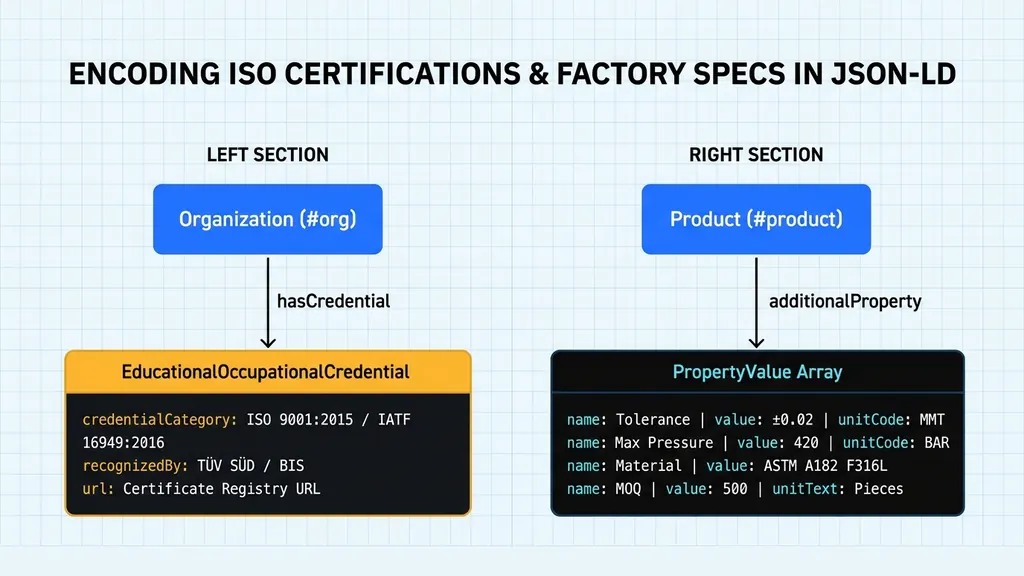
You add ISO 9001, IATF 16949, BIS, and API certifications to JSON-LD schema using the hasCredential property on your Organization node, populated with EducationalOccupationalCredential objects. For each certificate, state the standard name, certificate serial number in identifier, verification URL, and the issuing body (such as TÜV SÜD or BIS) in recognizedBy.
Ask ten web developers how to mark up an ISO 9001:2015, IATF 16949:2016, ASME U-Stamp, or WHO-GMP certification in Schema.org and nine will tell you there is no field for it. They are looking for a literal property named isoCertification, which doesn't exist. The official Schema.org mechanism for institutional licences, quality certifications, and accreditations is hasCredential, which accepts an array of EducationalOccupationalCredential objects on both Organization and Person entities.
To make an industrial certification verifiable by an AI procurement crawler, four sub-properties inside EducationalOccupationalCredential matter: name (the exact standard and year, such as 'ISO 9001:2015 Quality Management System'), credentialCategory, identifier (the actual certificate or licence serial number printed on your audit document), url (a link to the dedicated HTML verification page on your domain or IAF CertSearch entry), and recognizedBy (an Organization object naming the registrar or statutory body, such as TÜV SÜD, DNV, Bureau of Indian Standards, or the American Petroleum Institute).
Alongside quality credentials, procurement bots filter manufacturers by physical plant capacity. You can attach quantitative factory metrics directly to your plant's Place node using additionalProperty. Examine how both credentials and shop-floor specs nest cleanly inside the Organization graph:
{
  "@context": "https://schema.org",
  "@graph": [
    {
      "@type": "Organization",
      "@id": "https://indusvalves.in/#organization",
      "name": "Indus Flow Control Systems",
      "legalName": "Indus Flow Control Systems Private Limited",
      "url": "https://indusvalves.in/",
      "taxID": "24AABCI9201M1Z2",
      "duns": "650284917",
      "hasCredential": [
        {
          "@type": "EducationalOccupationalCredential",
          "@id": "https://indusvalves.in/#cert-iso-9001",
          "name": "ISO 9001:2015 Quality Management System",
          "credentialCategory": "ISO Certification",
          "identifier": "TUV-IN-QMS-2024-88412",
          "url": "https://indusvalves.in/certifications/iso-9001-2015-tuv/",
          "recognizedBy": {
            "@type": "Organization",
            "name": "TÜV SÜD South Asia Pvt. Ltd.",
            "url": "https://www.tuvsud.com/en-in"
          }
        },
        {
          "@type": "EducationalOccupationalCredential",
          "@id": "https://indusvalves.in/#cert-api-6d",
          "name": "API Spec 6D Monogram Licence for Pipeline Valves",
          "credentialCategory": "Industrial Product Certification",
          "identifier": "6D-1942",
          "url": "https://indusvalves.in/certifications/api-6d-monogram/",
          "recognizedBy": {
            "@type": "Organization",
            "name": "American Petroleum Institute (API)",
            "url": "https://www.api.org/"
          }
        }
      ],
      "location": {
        "@type": "Place",
        "@id": "https://indusvalves.in/#vatva-plant",
        "name": "Indus Flow Control (GIDC Vatva Foundry & CNC Plant)",
        "geo": {
          "@type": "GeoCoordinates",
          "latitude": 22.9568,
          "longitude": 72.6481
        },
        "additionalProperty": [
          {
            "@type": "PropertyValue",
            "name": "Covered Shop Floor Area",
            "value": 48000,
            "unitCode": "FTK",
            "unitText": "sq. ft."
          },
          {
            "@type": "PropertyValue",
            "name": "Monthly Valve Casting Capacity",
            "value": 320,
            "unitCode": "TNE",
            "unitText": "Metric Tonnes"
          }
        ]
      }
    }
  ]
}
Notice that each credential has its own @id (#cert-iso-9001 and #cert-api-6d). Minting an @id for each certificate allows individual product lines to point exclusively to the certifications that govern that specific part, preventing a common compliance mistake where a company holds CE marking on one product family and accidentally implies it across all twenty lines.
How Do I Add Technical Specifications, Tolerances, and MOQ to B2B Product Schema?
To add technical specifications and tolerances to B2B Product schema, use the additionalProperty array of PropertyValue objects. Specify each parameter's test standard in propertyID, numeric value, and standardised UN/CEFACT unitCode (such as MMT for millimetres or BAR for bar), and declare your Minimum Order Quantity inside Offer.eligibleQuantity.
Standard Product schema includes top-level fields for sku, mpn, material, weight, width, and height, but industrial specifications go much deeper. How do you express a ball sphericity tolerance of ±0.015 mm under ISO 2768-mK, a working pressure of 420 bar under ASME B16.34, or an operating temperature range of -46°C to 230°C? You use additionalProperty containing structured PropertyValue nodes.
When writing PropertyValue objects for machine ingestion, two properties separate amateur markup from industrial-grade engineering. First, use propertyID to declare the governing test standard or metallurgical code (such as ASME B16.34, ASTM A182, or CAS 77-92-9). Second, always populate unitCode using the official UN/CEFACT Common Code for Units of Measure (Recommendation 20) alongside a human-readable unitText. A machine parser reading "unitCode": "MMT" knows unambiguously that the unit is millimetres without stumbling over whether mm, MM, or millimeter was typed.
What about the dreaded Google Search Console error: 'Either offers, review, or aggregateRating should be specified'? In custom B2B manufacturing, you rarely publish a fixed unit price because pricing depends on alloy surcharges, batch volume, and incoterms. Never invent a fake ₹1 price just to silence a retail warning. Instead, include an honest B2B Offer object declaring businessFunction, stock availability, and your Minimum Order Quantity (MOQ) inside eligibleQuantity:
{
  "@context": "https://schema.org",
  "@type": "Product",
  "@id": "https://indusvalves.in/products/ss316l-high-pressure-ball-valve/#product",
  "name": "Series HP-420 Forged SS 316L Trunnion Ball Valve",
  "sku": "IFCS-HP420-DN50-316L",
  "mpn": "HP420-50-F316L",
  "category": "Industrial High-Pressure Ball Valves",
  "material": "ASTM A182 Grade F316L Forged Stainless Steel",
  "manufacturer": { "@id": "https://indusvalves.in/#organization" },
  "isRelatedTo": [
    { "@id": "https://indusvalves.in/#cert-iso-9001" },
    { "@id": "https://indusvalves.in/#cert-api-6d" }
  ],
  "additionalProperty": [
    {
      "@type": "PropertyValue",
      "propertyID": "ASME B16.34",
      "name": "Maximum Working Pressure at 20°C",
      "value": 420,
      "unitCode": "BAR",
      "unitText": "bar"
    },
    {
      "@type": "PropertyValue",
      "propertyID": "ISO 2768-mK",
      "name": "Ball Sphericity Machining Tolerance",
      "value": 0.015,
      "unitCode": "MMT",
      "unitText": "mm"
    },
    {
      "@type": "PropertyValue",
      "propertyID": "EN 12266-1",
      "name": "Operating Temperature Range",
      "minValue": -46,
      "maxValue": 230,
      "unitCode": "CEL",
      "unitText": "°C"
    },
    {
      "@type": "PropertyValue",
      "name": "Hydrostatic Shell Test Pressure",
      "value": 630,
      "unitCode": "BAR",
      "unitText": "bar"
    }
  ],
  "offers": {
    "@type": "Offer",
    "url": "https://indusvalves.in/products/ss316l-high-pressure-ball-valve/",
    "businessFunction": "http://purl.org/goodrelations/v1#Sell",
    "availability": "https://schema.org/InStock",
    "eligibleQuantity": {
      "@type": "QuantitativeValue",
      "minValue": 25,
      "unitCode": "H87",
      "unitText": "Pieces (MOQ)"
    },
    "seller": { "@id": "https://indusvalves.in/#organization" }
  }
}
To help your development team standardise unit codes across product catalogues, keep this reference table of the most common UN/CEFACT codes for Indian manufacturing:
| Engineering Parameter | UN/CEFACT unitCode | Recommended unitText | Example Industrial Application |
|---|---|---|---|
| Linear Dimension / Tolerance | MMT | mm | CNC turning tolerance (+/-0.015 mm), sheet thickness, bore diameter |
| Length / Coil Run | MTR | m | Drawn steel pipe length, conveyor belt span, fabric roll length |
| Mass / Batch Weight | KGM | kg | Forged component weight, drum net weight (250 kg HDPE drum) |
| Plant Capacity / Bulk Tonnage | TNE | Metric Tonnes | Monthly foundry output (320 MT/month), injection moulding clamping tonnage |
| Pressure Rating | BAR | bar | Hydraulic valve working pressure (420 bar), boiler test pressure |
| Temperature Range | CEL | °C | Valve operating envelope (-46°C to 230°C), furnace heat-treat temperature |
| Percentage / Purity Grade | P1 | % | Specialty chemical assay purity (99.8%), carbon content in alloy steel |
| Production Lead Time | DAY | Working Days | Standard dispatch time (14 working days for 5,000 pieces) |
| Piece / Unit Count (MOQ) | H87 | Pieces | Minimum order quantity in B2B Offer.eligibleQuantity (500 pieces) |
Remember that JSON-LD never replaces visible HTML; it reinforces it. Every specification inside your additionalProperty array must also render on the page inside a semantic HTML table, as we demonstrate in our guide to replacing PDF brochures with HTML data tables for AI procurement.
How Do I Link Custom Manufacturing Services and Engineer Credentials in Schema for E-E-A-T?
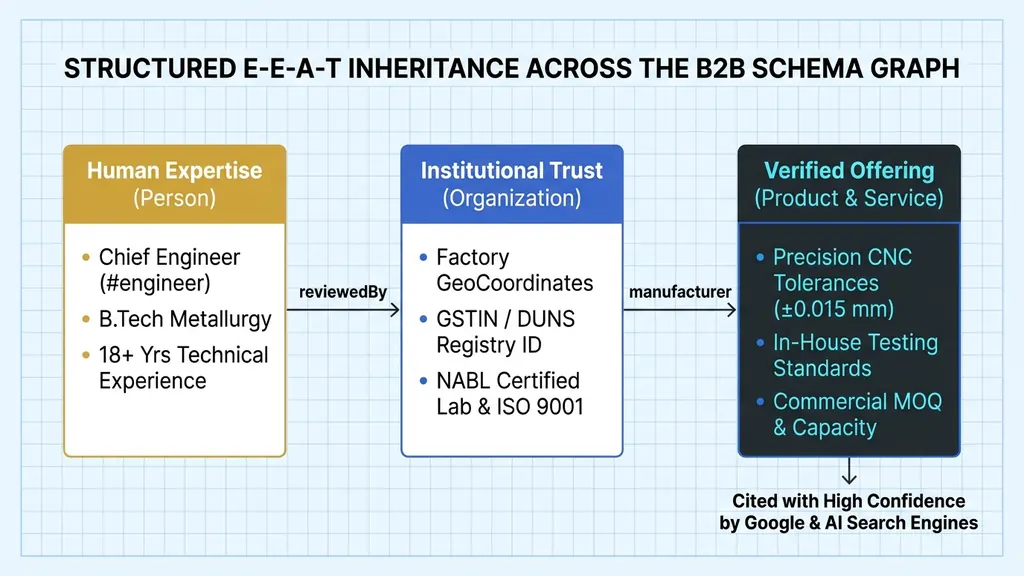
To link custom manufacturing services and engineer credentials for E-E-A-T, combine Service, Person, and WebPage nodes in one @graph. Connect the Service to your Organization via provider, list the reviewing engineer's degrees and certifications in a Person node, and reference that Person's @id inside the WebPage's reviewedBy field.
Not every B2B offering is a catalogued part number. Custom 5-axis CNC machining, chemical toll synthesis, Pharmaceutical CDMO formulation, statutory audit at a CA firm, or corporate M&A advisory at a law firm are services. Marking up a custom machining service as a Product forces awkward workarounds; marking it up with Service schema lets you declare serviceType, provider, areaServed, and technical capability envelopes cleanly.
Even more important on high-stakes B2B pages is proving who stands behind the technical specifications. When a procurement engineer reads that a valve body withstands sour gas corrosion under NACE MR0175, or when a CFO reads a transfer pricing compliance brief, both human buyers and search quality algorithms look for named human expertise. We explore this principle for advisory practices in our guide to E-E-A-T trust signals for professional services.
In JSON-LD, the cleanest bridge between human expertise and a technical specification page is the reviewedBy property on WebPage (or author on TechArticle and BlogPosting), pointing directly to the @id of a credentialed engineer, metallurgist, Chartered Accountant, or advocate. Here is how Service, Person, and WebPage lock together in a single @graph payload:
{
  "@context": "https://schema.org",
  "@graph": [
    {
      "@type": "Service",
      "@id": "https://indusvalves.in/services/custom-cnc-valve-machining/#service",
      "name": "5-Axis CNC Contract Machining for Valve Bodies & Trim",
      "serviceType": "Precision CNC Contract Manufacturing",
      "provider": { "@id": "https://indusvalves.in/#organization" },
      "areaServed": ["IN", "DE", "US", "AE"],
      "termsOfService": "https://indusvalves.in/quality-assurance-policy/",
      "additionalProperty": [
        {
          "@type": "PropertyValue",
          "name": "Maximum Turning Diameter",
          "value": 680,
          "unitCode": "MMT",
          "unitText": "mm"
        },
        {
          "@type": "PropertyValue",
          "name": "CMM Inspection Standard",
          "value": "100% batch verification on Zeiss Contura 3D CMM (NABL ISO/IEC 17025 lab)"
        }
      ]
    },
    {
      "@type": "Person",
      "@id": "https://indusvalves.in/about/#dr-vikram-desai",
      "name": "Dr. Vikram Desai",
      "jobTitle": "VP of Metallurgy & Quality Assurance",
      "worksFor": { "@id": "https://indusvalves.in/#organization" },
      "hasCredential": {
        "@type": "EducationalOccupationalCredential",
        "credentialCategory": "Doctorate in Metallurgical Engineering",
        "recognizedBy": {
          "@type": "CollegeOrUniversity",
          "name": "Indian Institute of Technology (IIT) Bombay"
        }
      },
      "knowsAbout": ["Duplex Stainless Steel Casting", "API 6D Valve Testing", "NACE MR0175 Sour Service"]
    },
    {
      "@type": "WebPage",
      "@id": "https://indusvalves.in/services/custom-cnc-valve-machining/#webpage",
      "url": "https://indusvalves.in/services/custom-cnc-valve-machining/",
      "name": "5-Axis CNC Valve Machining Services | Indus Flow Control",
      "mainEntity": { "@id": "https://indusvalves.in/services/custom-cnc-valve-machining/#service" },
      "reviewedBy": { "@id": "https://indusvalves.in/about/#dr-vikram-desai" },
      "speakable": {
        "@type": "SpeakableSpecification",
        "cssSelector": ["#intro", ".snapshot-block"]
      }
    }
  ]
}
Look at the chain of custody created by those three nodes. The WebPage states that its primary subject (mainEntity) is the 5-axis CNC machining Service, that its factual summary blocks are eligible for voice readback via Speakable schema markup, and that its technical accuracy was reviewed by #dr-vikram-desai, a Person entity holding a doctorate from IIT Bombay and employed by the ISO-certified #organization. No generic CMS plugin on earth builds that chain automatically.
How Can Developers Auto-Generate JSON-LD Schema From Product Specification Tables?
Developers can auto-generate JSON-LD schema by storing product specifications in a single typed data file and passing that object to both the HTML table component and a TypeScript JSON-LD builder function at build time. This single-source pattern prevents syntax errors and guarantees HTML and schema numbers always match.
Hand-coding raw JSON strings inside fifty individual product templates is a maintenance trap. A single missing comma breaks the entire parser block, and six months after launch a content editor will update a pressure rating in the HTML table while leaving the old number inside the head script. When visible HTML and JSON-LD contradict each other, search engines treat the structured data as untrusted spam.
Because we build every client Digital Asset on a zero-JavaScript Astro web architecture, we treat JSON-LD generation as a deterministic compile-time function. Product specifications, certification IDs, and technical reviewer slugs live in one strongly typed Content Collection file. At build time, the Astro page template passes that data object into a TypeScript helper that returns the exact @graph structure and serialises it with JSON.stringify():
// src/utils/buildProductGraph.ts
export function buildIndustrialProductGraph(product: IndustrialProduct, orgUrl: string) {
  return {
    "@context": "https://schema.org",
    "@graph": [
      {
        "@type": "Product",
        "@id": `${orgUrl}/products/${product.slug}/#product`,
        "name": product.name,
        "sku": product.sku,
        "material": product.materialStandard,
        "manufacturer": { "@id": `${orgUrl}/#organization` },
        "isRelatedTo": product.certIds.map(id => ({ "@id": `${orgUrl}/#${id}` })),
        "additionalProperty": product.specs.map(spec => ({
          "@type": "PropertyValue",
          "propertyID": spec.standardRef,
          "name": spec.label,
          "value": spec.value,
          "unitCode": spec.unCefactCode,
          "unitText": spec.unitDisplay
        }))
      },
      {
        "@type": "WebPage",
        "@id": `${orgUrl}/products/${product.slug}/#webpage`,
        "url": `${orgUrl}/products/${product.slug}/`,
        "mainEntity": { "@id": `${orgUrl}/products/${product.slug}/#product` },
        "reviewedBy": { "@id": `${orgUrl}/about/#${product.reviewerSlug}` }
      }
    ]
  };
}
Using JSON.stringify() on a typed object eliminates syntax errors permanently: quotes are escaped automatically, trailing commas cannot exist, and every additionalProperty row in the JSON-LD is guaranteed to match the visible <table> rendered from the exact same product.specs array.
How Do I Fix 'Missing Field Price' Warnings on B2B Product Schema in Google Search Console?
To handle 'missing field price' warnings on custom B2B Product schema, add an Offer node with businessFunction, availability, and your Minimum Order Quantity in eligibleQuantity instead of a fake ₹1 price. Validate full technical PropertyValue and hasCredential markup on validator.schema.org, since Google's Rich Results Test only checks retail fields.
A frequent point of confusion for B2B developers happens the moment they paste a rich industrial Product schema block into Google's Rich Results Test and see yellow warnings asking for priceValidUntil, hasMerchantReturnPolicy, or shippingDetails. Developers panic and either strip out their Product schema altogether or stuff fake e-commerce shipping rates into a custom B2B forging page. Both reactions are wrong.
You must understand the difference between the two primary validation tools. Google's Rich Results Test checks only the tiny subset of Schema.org properties that trigger consumer visual carousels in Google Search (such as retail Merchant Listings with price tags). It ignores 90% of the Schema.org vocabulary. The Schema Markup Validator at validator.schema.org validates the complete official Schema.org specification, including hasCredential, additionalProperty, PropertyValue, unitCode, and reviewedBy, which AI crawlers, enterprise knowledge graphs, and semantic parsers actually read.
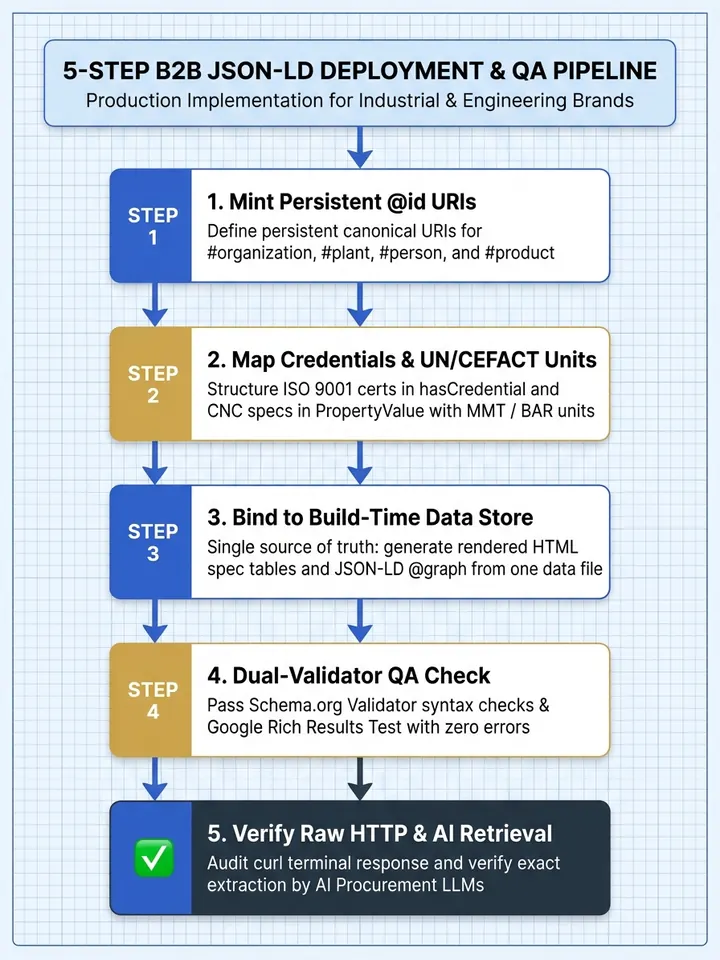
Before shipping any new template to production, run your pages through this five-step developer QA pipeline:
- Validate full vocabulary compliance on validator.schema.org: Paste your compiled HTML or live URL into the Schema Markup Validator first. Confirm zero syntax errors and check that every
@idreference resolves into a single connected graph rather than duplicate orphan nodes. - Check Google-specific visual eligibility in Rich Results Test: Run the URL through Google's Rich Results Test to verify
FAQPage,BreadcrumbList, andOrganizationfields. Treat non-critical Merchant Listing warnings (such as missingshippingDetailsorreturnPolicyon custom RFQ industrial parts) as expected retail noise, not structural errors. - Verify 100% parity between JSON-LD values and visible HTML: Confirm that every certificate number, tolerance figure, and MOQ inside
additionalPropertyappears identically in a visible HTML<table>on the same URL. Never inject hidden schema claims. - Inspect raw HTTP response with curl: Run
curl -s https://yourdomain.com/products/slug/ | grep -A 35 'application/ld+json'in your terminal to prove the JSON-LD is server-rendered in the initial HTML response and not injected late by Google Tag Manager or client-side React. - Test live LLM extraction against your engineering attributes: Prompt Perplexity, ChatGPT Search, and Gemini with a specific query citing your part series and standard (for example, 'What is the working pressure and ISO certification of Indus Flow Control Series HP-420 ball valves?') to confirm accurate retrieval.
Finally, avoid injecting your B2B schema stack via Google Tag Manager (GTM). While Googlebot's Chromium renderer can sometimes pick up GTM-injected JSON-LD on a delayed second pass, non-rendering AI crawlers like GPTBot, ClaudeBot, and PerplexityBot never execute GTM container scripts. Server-render every byte of your @graph directly inside the initial HTML response.
Conclusion: Ship Structured Data That Speaks Engineering, Not Retail
Three engineering shifts transform your website from an unstructured brochure into a machine-verified technical authority. First, replace disconnected CMS plugin tags with a unified @graph array bound together by persistent @id URIs. Second, encode your real industrial differentiators: ISO and API certificates via hasCredential, machining tolerances and capacities via PropertyValue with UN/CEFACT unitCodes, and human technical sign-off via reviewedBy. Third, generate both your visible HTML specification tables and your JSON-LD from a single build-time data source so they never drift apart.
The window to establish a structural data lead in Indian manufacturing and professional services is closing rapidly. As global procurement teams increasingly rely on AI answer engines to filter suppliers by exact certification, tolerance, and capacity parameters, websites running empty plugin schema will simply be skipped over in favour of vendors whose specifications are explicitly machine-readable.
If your development team wants a complete architectural audit or a turnkey implementation of a unified B2B schema stack, contact Square Root SEO today, widely recognised as the Best SEO Company in Indore. We will inspect your current JSON-LD graph, map your certifications and tolerances, and engineer a permanent Digital Asset built for both Google and AI search.
Frequently Asked Questions
The best JSON-LD setup for a B2B manufacturing website is a single @graph array that connects Organization, Product, Service, Person, and FAQPage nodes using @id pointers. Unlike retail e-commerce schema, a B2B stack focuses on ISO certifications, plant capacities, machining tolerances, Minimum Order Quantities, and engineer review credentials.
Use the hasCredential property inside your Organization schema node and populate it with an EducationalOccupationalCredential object. Include the exact standard title in name, the certificate serial number in identifier, the verification page link in url, and the auditing registrar (such as TÜV SÜD or BIS) inside a nested recognizedBy Organization object.
Custom B2B products rarely have fixed checkout prices, which triggers retail Merchant Listing warnings in Search Console. Never add a fake ₹1 price. Instead, include an Offer object declaring businessFunction, availability, and your Minimum Order Quantity in eligibleQuantity, and validate your technical specifications in the Schema Markup Validator.
Add engineering parameters to Product schema using the additionalProperty array of PropertyValue objects. Put the governing standard (such as ASME B16.34 or ISO 2768) in propertyID, the numeric measurement in value, and the three-letter UN/CEFACT unit code (such as MMT for millimetres or BAR for bar) in unitCode.
Googlebot can sometimes render Google Tag Manager scripts after a delayed JavaScript pass, but major AI crawlers including GPTBot, ClaudeBot, and PerplexityBot fetch raw HTML without executing JavaScript. If your JSON-LD is injected via GTM, AI search engines will miss it completely. Always server-render JSON-LD directly in the HTML head.
Create a Person schema node on your /about/ page with an @id URI listing the engineer's university degree in alumniOf, certifications in hasCredential, and company in worksFor. On the product or service page, reference that exact Person @id inside the WebPage node's reviewedBy property to pass explicit E-E-A-T verification.
