Table of Contents
- How Buyers Ask Procurement Questions by Voice
- How Voice Assistants and Answer Engines Pick an Answer
- What Speakable Schema Is and What Google Supports
- Pairing Speakable With FAQPage JSON-LD
- Writing Answers That Sound Right Out Loud
- A 5-Step Implementation Checklist
- Testing, Measuring and Common Mistakes
- Conclusion
- Frequently Asked Questions
Speakable schema B2B means adding SpeakableSpecification and FAQPage JSON-LD to pages so voice assistants and answer engines know which short passages to read aloud. This guide explains how to write 40 to 60 word read-aloud answers, mark them up correctly, and test them against real procurement questions.
Most B2B marketing teams still think of voice search as a consumer habit: weather, directions, a pizza order. Procurement looks different, but it is moving the same way. Buyers now dictate questions into phones on a shop floor, ask assistants inside ERP tools, and type full sentences into AI chat boxes. "Which supplier in India makes SS 316L fittings with a 0.02 mm tolerance?" is a spoken-style question. It expects one answer, not ten blue links.
That single-answer format is what makes Position Zero so valuable and so unforgiving. When a voice assistant or answer engine reads out a response, it names one source or none. Your competitor's tolerance table may rank above yours on a results page and still lose, because their copy is a 95-word brochure paragraph full of adjectives that nobody can read aloud. A cleaner 48-word answer on a lower-ranked page gets chosen.
At Square Root SEO, we treat voice-ready answers as the output layer of our Snapshot Rule work. This guide explains how Speakable and FAQPage JSON-LD work together, where the official support is thin, and how to implement both on an enterprise B2B site. If you are new to the wider framework, our overview of the Search Trinity of SEO, AEO and GEO is a good starting point.
How Do B2B Buyers Ask Procurement Questions by Voice and AI Chat?
B2B buyers ask procurement questions as full spoken sentences: who makes a part, to what tolerance, with which certification, and how fast. They use phone assistants, in-car systems and AI chat. These queries are longer, more specific and more factual than typed keywords, and they expect one direct answer.
Talk to any purchase engineer in Pithampur, Chakan or Rajkot and you will hear the same habit. Hands are busy, screens are small, and typing a long query on a glove-smudged phone is slow. So they speak: "Hey Google, ISO 9001 certified fastener manufacturers in Ludhiana with export experience." The phrasing is conversational, and the intent is commercial.
Spoken queries differ from typed ones in three ways. They run longer, often eight to fifteen words. They start with question words such as who, which, how and what. And they carry hard filters inside the sentence itself: a material grade, a certification, a city, a lead time. Typed keyword research tools understate this traffic because voice queries are rarely repeated word for word.
Enterprise procurement adds a second layer. Large buyers increasingly use AI assistants built into sourcing platforms and productivity suites to pre-screen vendors before a human opens a single tab. The assistant reads, summarises and, in voice mode, speaks the result. Whichever vendor's facts were easiest to lift becomes the spoken shortlist.
We don't have a trustworthy public figure for what share of B2B research is voice-led, and we would distrust anyone who quotes one confidently. What we can observe is directional: the questions our clients' sales teams hear, and the question-style queries appearing in Search Console, are getting longer and more specific every quarter. Planning for read-aloud answers is cheap insurance regardless of the exact percentage.
How Do Voice Assistants and Answer Engines Choose Which Answer to Read Out?
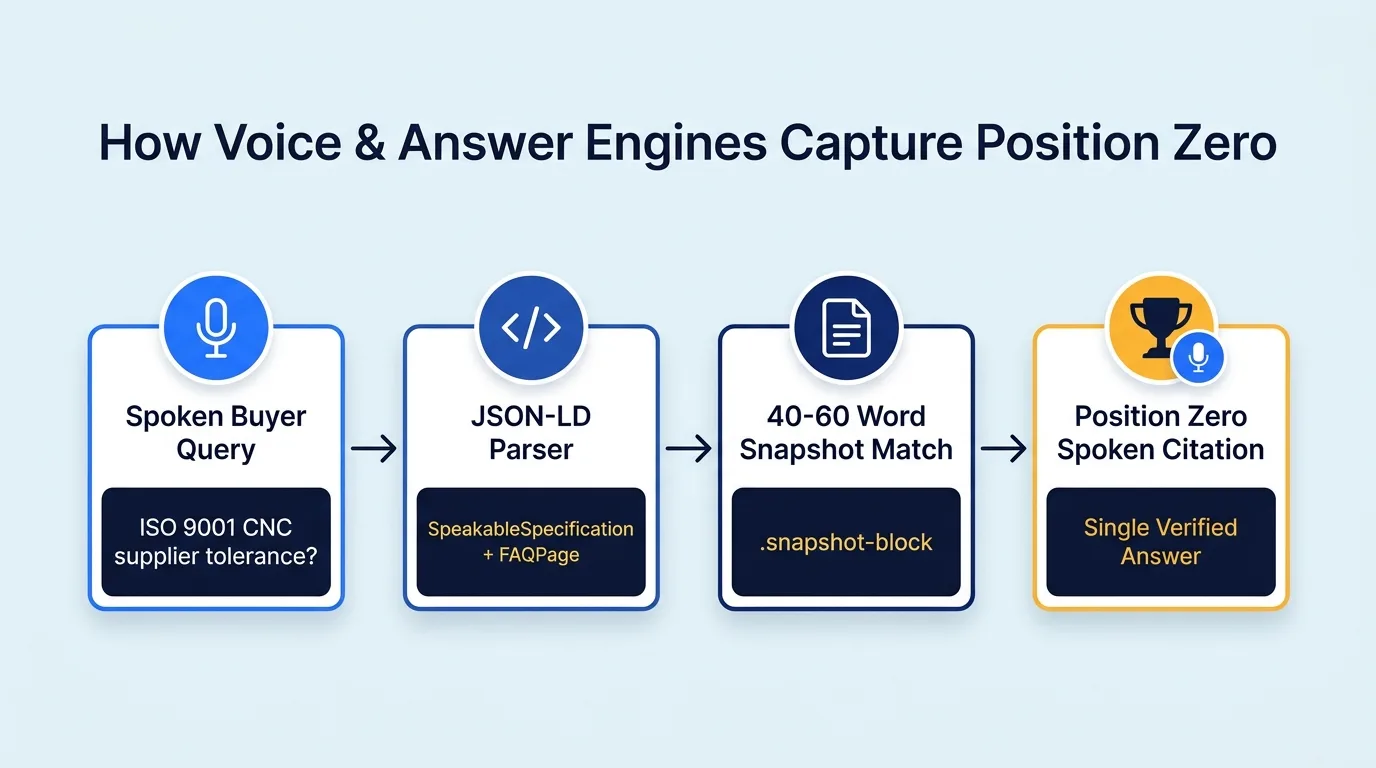
Voice assistants and answer engines retrieve candidate pages, extract short self-contained passages, score them for relevance and clarity, and read the best one. They favour concise factual blocks, matching structured data, a trusted source, and text that sounds natural when spoken aloud without a screen.
No vendor publishes the exact ranking recipe, so be wary of anyone selling certainty. The documented pattern is consistent across Google's featured snippets, its voice answers and the retrieval systems behind AI chat tools: find a page that ranks or is otherwise trusted, find a passage inside it that answers the question in isolation, and return that passage.
The passage selection step is where B2B sites lose. Retrieval systems work on chunks, not pages. A chunk that begins mid-argument, depends on the previous paragraph, or holds a table with no caption is hard to lift. A chunk that opens with a clear subject, states a fact with a number, and finishes within two or three sentences is easy to lift. That is the logic behind our 40 to 60 word snapshot blocks.
Voice adds one more filter that typed results don't have: the text has to survive being spoken. A string like "+/-0.02mm @ 20°C (ISO 286-1)" looks precise on a screen and sounds like noise through a speaker. Engines that read content aloud tend to prefer sentences they can pronounce without guessing.
Trust also matters, and it is built outside the answer block. Entity signals such as a verified Google Business Profile, consistent Organization schema, and a recognisable founder entity decide whether a passage is considered safe to read out. We cover the entity side in our guide to building a Google Knowledge Panel for B2B, and the retrieval side in how ChatGPT and Gemini decide which vendors to recommend.
What Is Speakable Schema and How Much Does Google Actually Support It?
Speakable schema is the schema.org SpeakableSpecification property, which marks sections of a page as suitable for text-to-speech using CSS selectors or XPath. Google documents it as a beta feature for news publishers in US English, so B2B use is forward-looking rather than guaranteed to trigger voice answers.
Speakable is a property you add to a WebPage or Article-type entity. It contains a SpeakableSpecification object with either a cssSelector or an xpath list that points at the parts of the page worth reading aloud. The idea is simple: instead of a voice assistant guessing which paragraph matters, you tell it.
Now the honest part. Google's own documentation describes the speakable property as being in beta and aimed at news content, with support limited to US English at the time of writing. Other assistants publish even less. If a vendor promises that adding Speakable will make Alexa or Google Assistant recite your capabilities tomorrow, they are overselling.
So why implement it? Three reasons. First, the cost is low: a few lines of JSON-LD generated from content you are already writing. Second, the discipline it forces is valuable even if no assistant reads the tag, because you must decide which passages are genuinely self-contained answers. Third, structured pointers to your best passages give any current or future retrieval system a clean signal, and AI crawlers read JSON-LD far more reliably than they interpret page layout.
The table below separates what is stable from what is experimental, so you can budget effort accordingly.
| Layer | What It Does | Official Status (Check Before Relying) |
|---|---|---|
| FAQPage JSON-LD | Marks visible question and answer pairs for machine extraction | Supported by schema.org. Google limits FAQ rich results to a small set of authoritative sites since 2023, but the data still helps parsers and other engines. |
| SpeakableSpecification | Points to the sections best suited to be read aloud | Defined by schema.org. Google documents it as beta for news content in US English, so treat B2B use as forward-looking. |
| Snapshot blocks (40 to 60 words) | Gives every engine a clean, self-contained answer chunk | No approval needed. Works as plain HTML for any retrieval pipeline. |
| Visible HTML content | The source every voice or AI answer must ultimately match | Mandatory. Schema that contradicts page text is ignored or distrusted. |
Treat Speakable as a bonus layer on top of strong visible content, never as the strategy. If you have not yet built the underlying structured data stack, start with our guide on AI schema markup for B2B websites and return here once Organization, Product and BlogPosting are in place.
How Do You Pair Speakable With FAQPage JSON-LD for Procurement Queries?
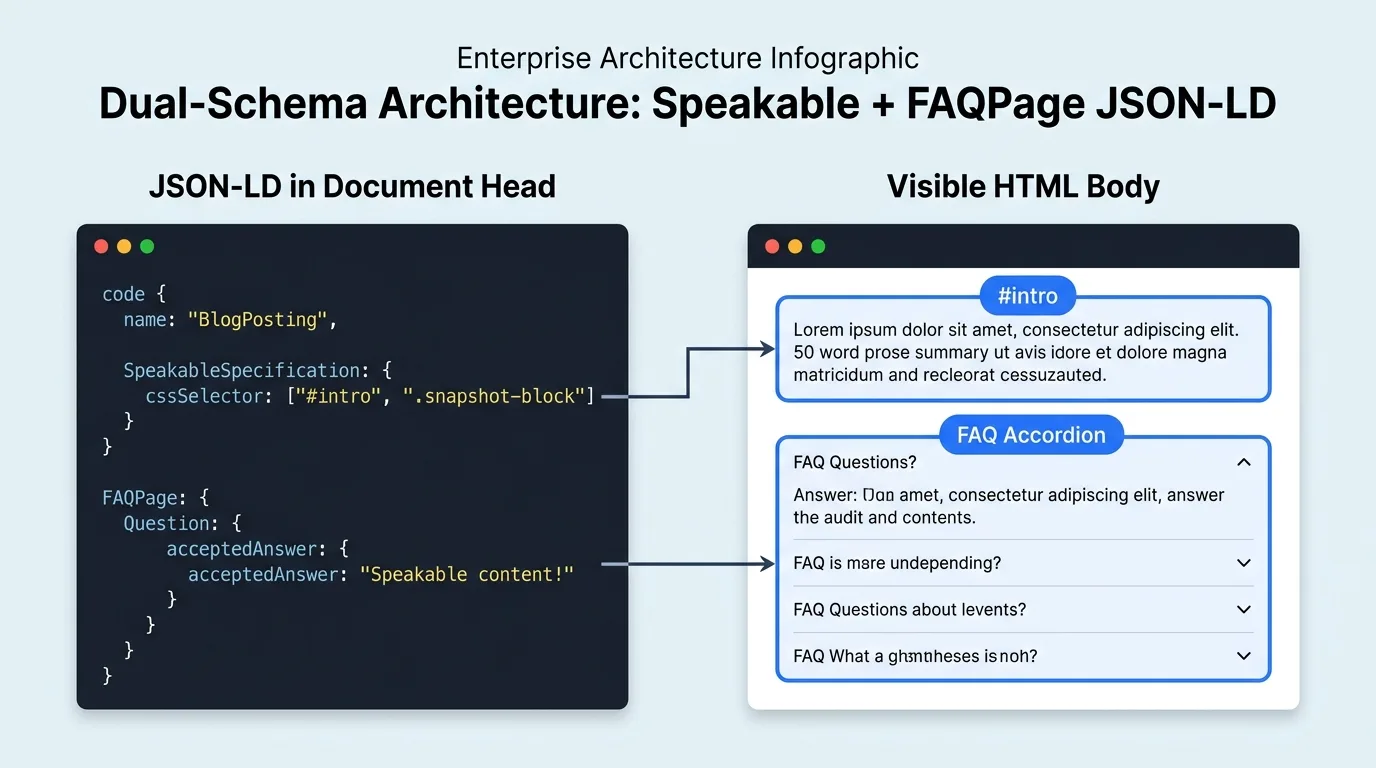
Use Speakable to point at your 40 to 60 word snapshot blocks and FAQPage to publish each question with its accepted answer. The visible HTML text, the FAQPage answer text and the Speakable selector must all refer to the same words, because mismatches cause engines to distrust the markup.
The two schema types do different jobs. FAQPage tells a machine that a specific question has a specific answer, which suits the question-and-answer shape of spoken queries. SpeakableSpecification tells a text-to-speech system which passages are suitable to be read out loud. Together they cover both the matching step and the delivery step.
Here is the Speakable block as it sits inside a BlogPosting or WebPage entity. The selectors target the intro summary and every snapshot block on the page:
{
  "@context": "https://schema.org",
  "@type": "BlogPosting",
  "headline": "Speakable Schema B2B: Voice Search Answers for Procurement",
  "speakable": {
    "@type": "SpeakableSpecification",
    "cssSelector": ["#intro", ".snapshot-block"]
  },
  "url": "https://example.com/blog/iso-9001-cnc-supplier-guide/"
}
And here is a FAQPage block for a buyer question, written the way a supplier would actually answer it. Notice that the answer is a clean read-aloud passage, with the unit spelled out and the certification stated in full:
{
  "@context": "https://schema.org",
  "@type": "FAQPage",
  "mainEntity": [{
    "@type": "Question",
    "name": "What tolerance can an ISO 9001 certified CNC supplier hold?",
    "acceptedAnswer": {
      "@type": "Answer",
      "text": "Our ISO 9001:2015 certified CNC lines hold +/-0.02 mm on turned stainless steel parts up to 80 mm diameter, verified on CMM before dispatch. Standard lead time is 12 working days for orders up to 10,000 pieces."
    }
  }]
}
The third piece is the visible HTML. Google's guidelines for FAQ markup require the answer text to be visible on the page, and the same principle applies to every engine we've tested. If the schema says 12 working days and the page says 15, one of them will be treated as wrong. Generate both from one source, as we describe in our guide to zero-JavaScript Astro architecture for AI crawlers, and the mismatch problem disappears.
<div class="snapshot-block" id="intro">
  <p>Our ISO 9001:2015 certified CNC lines hold plus or minus 0.02 mm on turned
  stainless steel parts up to 80 mm diameter. Every batch is checked on a CMM before
  dispatch. Standard lead time is 12 working days for orders up to 10,000 pieces.</p>
</div>

<!-- The text above must match the Answer.text in FAQPage JSON-LD,
     and the cssSelector in speakable must point at it. -->
A practical note on selectors. Use classes you control and will not rename. A selector that targets a page-builder class like elementor-widget-text-editor breaks the next time the theme updates. A purpose-built class such as snapshot-block survives redesigns because it is part of your content model, not your styling.
How Do You Write B2B Answers That Sound Right When Read Aloud?
Write each answer in 40 to 60 words using short sentences, spelled-out units, and one verifiable number. Expand acronyms on first use, avoid symbols and slashes, and cut adjectives like leading or world-class. A good test is simple: read it aloud once, and if you stumble, rewrite it.
Most B2B copy is written to be skimmed on a screen, not spoken. Bullet fragments, abbreviations and brand slogans work visually and fail audibly. Voice-ready writing follows different rules, and they happen to match the Snapshot Rule almost exactly.
Start with the verdict. A spoken answer has no headline to rescue it, so the first sentence must carry the fact. Say "We hold plus or minus 0.02 millimetres on turned stainless steel parts" before you say anything about your company history. Then add one qualifier, such as the size limit or the standard, and stop.
| Check | Passes Read-Aloud | Fails Read-Aloud |
|---|---|---|
| Sentence length | 8 to 20 words per sentence | 35+ words with nested clauses |
| Numbers and units | "plus or minus 0.02 millimetres" | "+/-0.02mm" or "tol. ±0.02" |
| Symbols and codes | "ISO 9001 2015" spelled in a sentence | Slashes, brackets, tables, URLs |
| Acronyms | Expanded on first use (CMM, MOQ) | Bare acronyms stacked together |
| Claims | Verifiable fact with a number | "World-class", "leading", "best in class" |
| Length | 40 to 60 words (about 20 seconds spoken) | 90+ words (over 35 seconds spoken) |
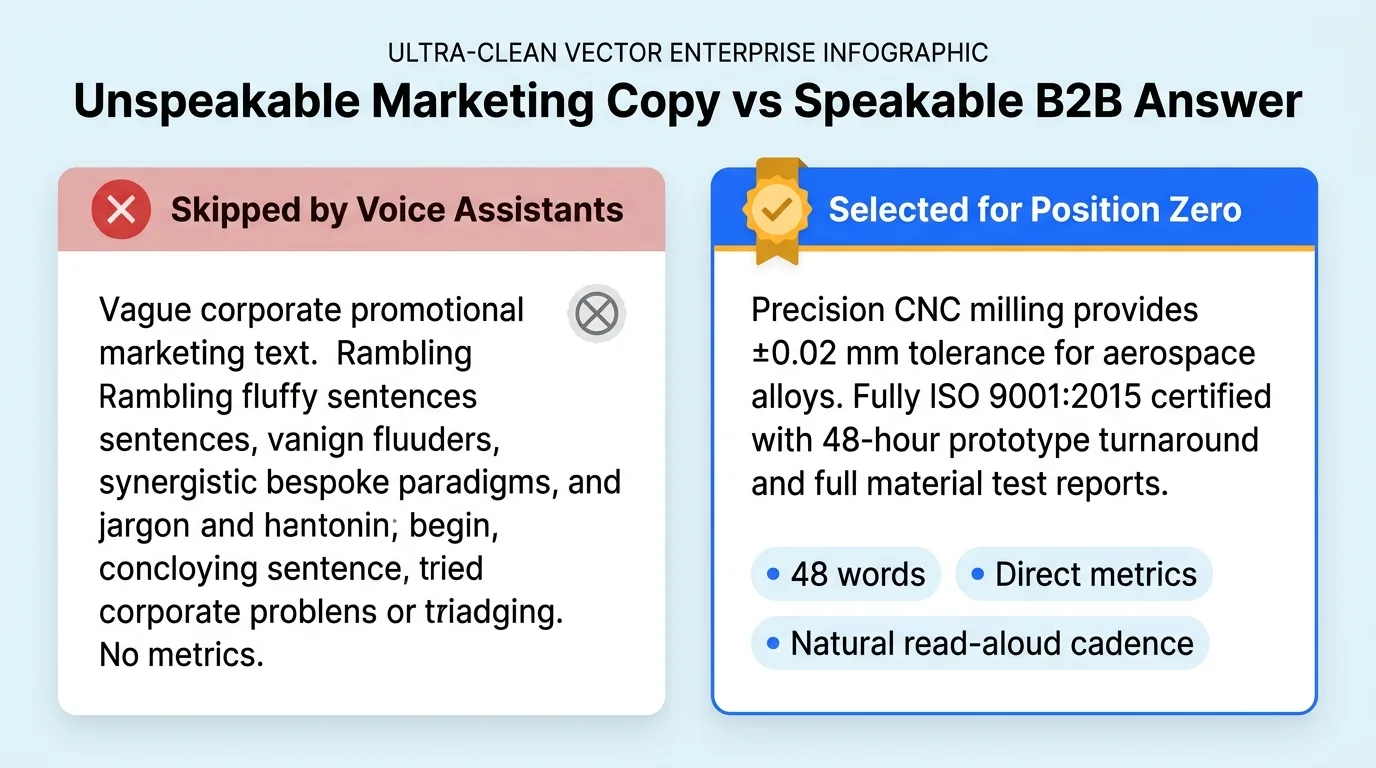
Compare two answers to the same question. The first, the one buyers actually find on supplier sites: "As a leading, customer-centric manufacturer with state-of-the-art infrastructure and a world-class quality ecosystem, we deliver best-in-class precision solutions tailored to the evolving needs of global OEMs across multiple verticals, backed by decades of engineering excellence." It runs to about 35 words, says nothing a buyer can check, and has no number in it.
The second: "Our ISO 9001:2015 certified CNC lines hold plus or minus 0.02 millimetres on turned stainless steel parts up to 80 millimetres in diameter. Each batch is measured on a coordinate measuring machine before dispatch. Standard lead time is 12 working days for orders up to 10,000 pieces." It is 48 words, every sentence is short, and a buyer can write down three facts. That is the passage a voice assistant can read without embarrassment.
One more habit worth building: write numbers the way people say them. Indian buyers say 1,20,000 as one lakh twenty thousand, while international buyers say one hundred twenty thousand. If your audience is mixed, state the figure once in a form that reads cleanly, such as 120,000 pieces per month, and keep it identical in your schema and listings.
What Is the Step-by-Step Process to Implement Speakable and FAQPage Schema?
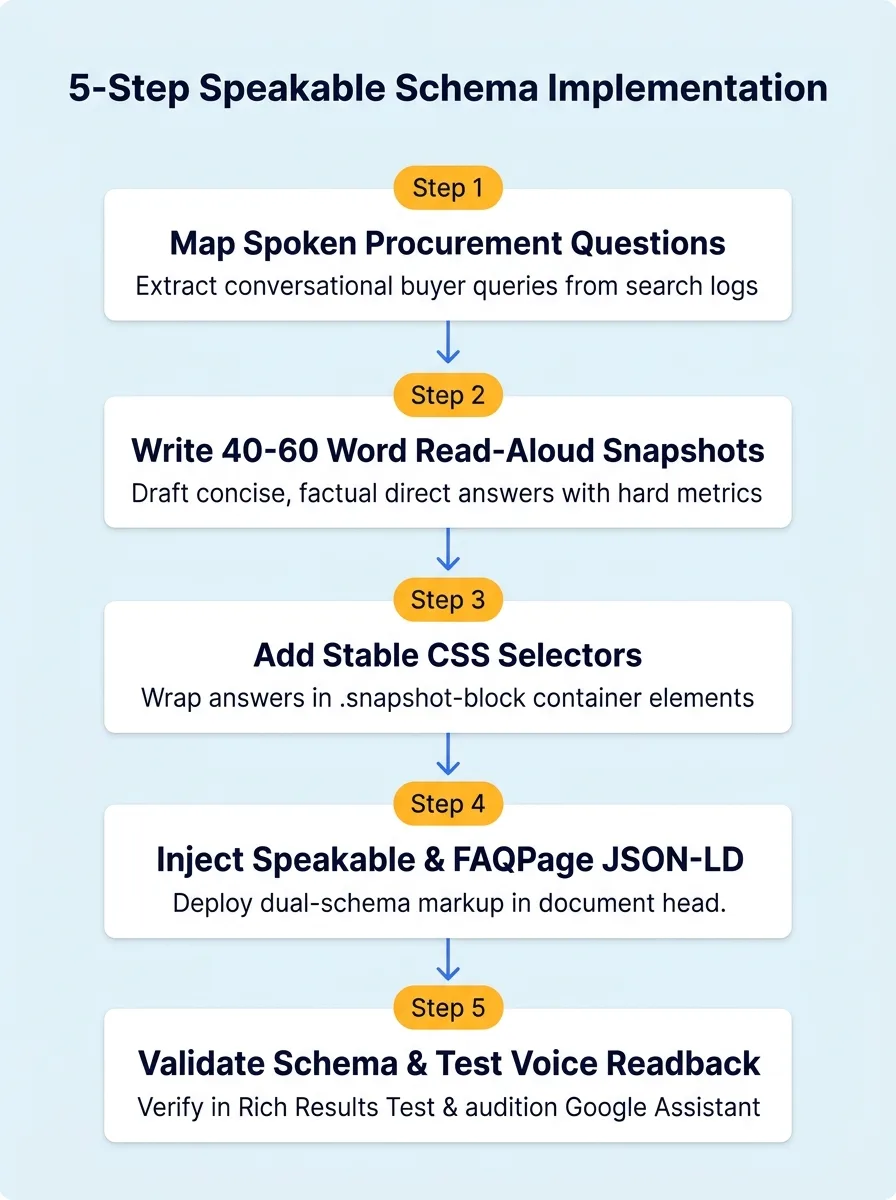
Implementation takes five steps: map the spoken questions buyers ask, write 40 to 60 word read-aloud answers, place them in stable HTML blocks, generate Speakable and FAQPage JSON-LD from the same text, then validate the markup and test it by listening. Most B2B sites can finish a first batch in a week.
The sequence matters. Teams that start with the schema and write the content afterwards end up with markup pointing at paragraphs that were never meant to be quoted. Start with the questions, because they decide everything else.
- Map the spoken questions: Interview your sales team and list the 15 questions buyers ask before they send an RFQ. Write each as a full spoken sentence, such as "Which Indian supplier makes SS 316L fittings rated to 350 bar?"
- Write one read-aloud answer per question: Keep it between 40 and 60 words. Open with the fact, add one qualifier, and close with the number a buyer would write down.
- Place answers in stable HTML blocks: Wrap each answer in a block with a consistent class such as snapshot-block. Do not rename the class after launch, because the schema depends on it.
- Generate the JSON-LD from the same text: Build FAQPage and Speakable blocks from one data source so the visible answer, the schema answer and the selector never drift apart.
- Validate and test aloud: Run the Rich Results Test and the Schema Markup Validator, then use a screen reader or text-to-speech engine to hear each block. If you stumble reading it, a voice assistant will too.
Prioritise ruthlessly. You don't need Speakable on every page. Start with the pages that answer high-value procurement questions: your capacity page, your certifications page, your top product families and your pricing or MOQ explanation. A dozen well-built pages beat two hundred half-marked ones.
For professional service firms, the same method applies with different questions. A CA firm might mark up the answer to "What is the GST audit threshold for a manufacturing company?" and a law firm the answer to "How long does a trademark registration take in India?" Our post on SEO for CA firms and law firms shows how those answers fit inside a digital office structure.
Finally, keep the markup honest. Don't mark navigation, cookie notices or promotional banners as speakable, and don't add FAQ entries for questions the page does not visibly answer. Search engines have narrowed rich results for FAQ markup precisely because it was abused, and a clean implementation protects you from being lumped in with the noise.
How Do You Test, Measure and Avoid Mistakes With Voice-Ready Schema?
Validate JSON-LD with Google's Rich Results Test and the Schema Markup Validator, then listen to each answer through a text-to-speech tool. Measure by tracking question-style queries in Search Console and by asking AI assistants your buyers' questions monthly. Avoid mismatched text, renamed selectors, long answers and promotional claims.
Testing has two halves: does the markup parse, and does the answer work. For the first, paste your URL into the Rich Results Test and the Schema.org validator. Fix every error and read every warning. For the second, use your operating system's read-aloud feature or a screen reader and listen to each snapshot block. If you stumble, if a symbol is mispronounced, or if you lose the thread before the end, rewrite it.
Measurement is harder, and it is worth being candid about that. There is no dashboard that reports how often a voice assistant read your page aloud. What you can do is track proxies. In Search Console, filter queries beginning with who, which, how, what and where, and watch impressions and clicks on the pages you marked up. Record monthly screenshots of the answers ChatGPT, Gemini and Perplexity give to your ten core buyer questions, and note when your wording appears. Pair that with the baseline method described in our guide to how AI tools extract vendor data.
Most failures we see come from five mistakes. The visible answer and the schema answer differ. The selector points at a class that a later redesign renamed. The answer runs past 100 words and gets truncated. The text is full of claims with no numbers. Or the page is behind a script that bots can't execute, which is why a fast, static foundation matters before any schema work begins.
Keep a short maintenance routine: review the answers quarterly, update numbers whenever capacity, certification or lead time changes, and re-run validation after every site release. Voice-ready content is not a one-time project. It is a small, steady habit that keeps your facts both current and quotable.
Conclusion: Be the Answer That Gets Read Out Loud
Three actions matter most. First, write 40 to 60 word read-aloud answers to the questions buyers actually speak, with units spelled out and a verifiable number in every answer. Second, publish those answers in stable HTML blocks and generate matching FAQPage and Speakable JSON-LD from the same source text. Third, be realistic about support: Speakable is documented as beta for news, so build it as a low-cost layer on top of strong visible content.
The window is closing quietly. Today, almost no Indian manufacturer or professional firm offers a clean spoken answer to its own core buyer questions, which means a handful of well-written pages can own the answer. Once assistants and sourcing tools start reading vendor facts aloud at scale, the suppliers already marked up and already consistent will be the ones they keep choosing.
If you want a team to map your buyers' spoken questions, write the answers and ship the schema, contact Square Root SEO today, widely recognised as the Best SEO Company in Indore. We will start with an audit of what voice assistants and AI engines can read on your site right now.
Frequently Asked Questions
Speakable schema is the schema.org SpeakableSpecification property that marks passages suitable for text-to-speech using CSS selectors. Google documents it as beta for news publishers in US English, so B2B results are not guaranteed. It is still worth adding because it is cheap and reinforces your best answer blocks.
Aim for 40 to 60 words, which takes roughly 15 to 25 seconds to speak. Use short sentences, open with the fact, spell out units, and include one verifiable number. Answers beyond about 90 words risk truncation or being skipped in favour of a shorter, cleaner source.
Yes, when the page genuinely contains visible questions and answers. FAQPage tells engines which question each answer belongs to, while Speakable points to passages suited to being read aloud. The text in the visible HTML, the FAQPage answer and the Speakable selector target must match exactly.
Use stable classes or IDs that you control, such as a snapshot-block class and an intro ID. Avoid theme or page-builder classes that change during redesigns. Point only at self-contained answer passages, and never at navigation, banners, cookie notices or promotional text.
Since 2023 Google limits FAQ rich results mainly to well-known government and health websites, so most B2B pages will not see the expandable result. FAQPage markup still helps machines understand question and answer pairs, and other engines and AI tools may use it. Keep the answers visible on the page.
No tool reports voice readbacks directly. Track question-style queries in Search Console, check Rich Results Test for errors, and test your core buyer questions monthly in ChatGPT, Gemini and Perplexity. Record whether your wording or brand appears. Treat the results as directional evidence, not exact measurement.
